The ad shows a phone on a nightstand and a line about an AI that trades while you sleep. You are new to this, the idea sounds great, and the app store has a hundred apps with "AI" in the name.
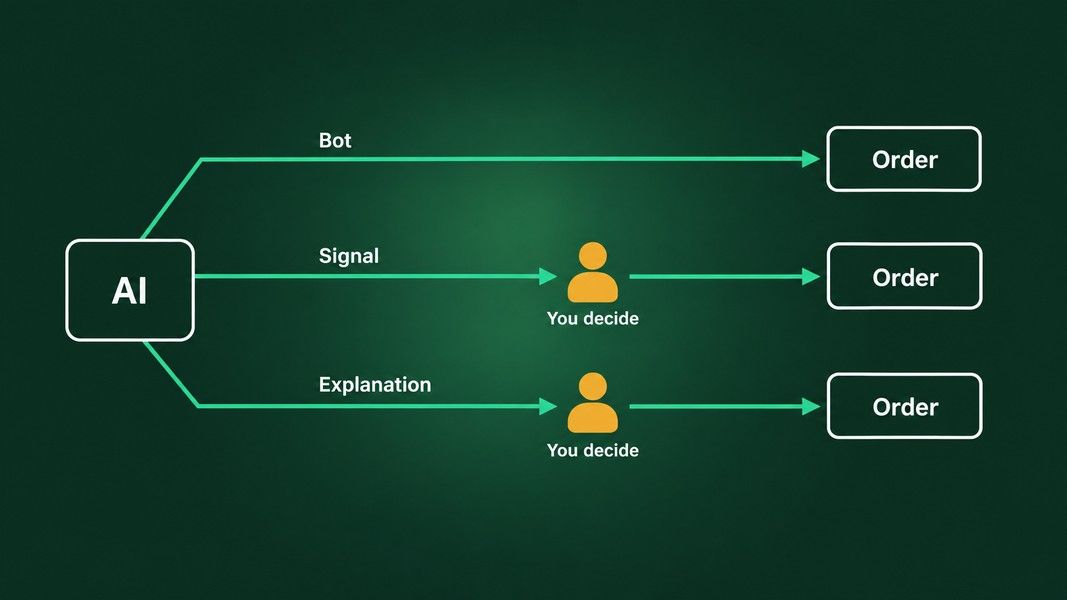
Here is the short answer before the long one. Every AI trading app does one of three jobs: it places trades for you, it sends you signals, or it explains a stock so you can decide. The difference that matters most for a beginner is not how clever the AI is. It is who presses buy.
This guide walks through the three kinds, what each one actually hands you, the red flags US regulators keep naming, and the handful of questions that sort a real product from a pitch. One of the apps mentioned, Primo Trade, is our own product, and it gets the same treatment as the rest.
What an AI Trading App Actually Does: Three Kinds
Strip the marketing away and you are left with three designs. They can live inside one app, but each answers a different question.
| Kind | What the AI does | Who presses buy | What you still own |
|---|---|---|---|
| Trades for you | Runs a strategy and places orders in a brokerage account | The software, inside rules you approved | The strategy, the account, the risk |
| Sends signals | Flags buy and sell moments or ranks stocks | You | Checking the signal and the timing |
| Explains | Reads a stock or a chart and writes up what it sees | You | The decision, start to finish |
A beginner usually searches for the first kind, because "an app that trades for you" sounds like the whole problem solved. It is worth slowing down there, because that kind also moves the most responsibility without moving any of the risk.
Kind One: The AI Trading App That Trades for You
These apps connect a strategy to real orders. You describe what you want, the software turns it into rules, and from then on it buys, sells and rebalances without asking you each time.
Two US examples show the shape, as their own sites described them on October 19, 2026. Composer says you can "build trading algorithms with AI, backtest them, then execute," and that it "executes your trading strategy, making trades and rebalancing automatically." Its brokerage is Composer Securities LLC, an SEC-registered broker-dealer and FINRA/SIPC member, with accounts carried by Alpaca Securities and Apex Clearing.
Public calls its version Agentic Brokerage. You describe a task in plain language, its AI proposes an Agent workflow you can edit, and the Agent monitors the market and executes trades directly in your account, with no API keys or third-party platform involved. Public's brokerage arm, Open to the Public Investing, is also a FINRA/SIPC member.
Notice the fine print, because it is the same idea in both places. Public states that "you are solely responsible for determining the suitability of any strategy and for verifying your instructions before activating your Agent." The software presses buy, but the decision to let it was yours, and so is the result.
The AI trading app that trades for you still needs a broker
Every legitimate version of this kind runs through a registered broker-dealer, either because the app is one or because it plugs into one. That is the first thing to check, and it takes a minute: FINRA's free BrokerCheck tool shows whether a firm is registered to sell securities, plus its regulatory actions and complaints.
An app that wants your money sent to a wallet, a "trading account" it runs itself, or a person you met online is not this kind of product at all. We come back to that below.
What Changes When a Bot Holds the Keys
Handing order placement to software changes three things a beginner rarely thinks about up front.
The first is the backtest. Strategy builders show how a set of rules would have done on past prices, and the chart often looks lovely, partly because rules can be tuned on that same history. A backtest tells you the rules were consistent with the past. It does not tell you the next year will rhyme with it.
The second is cost. The CFTC's customer advisory on AI trading bots tells readers to "consider the impact fees, spreads, and subscription costs" would have before trusting any platform. A bot that trades often pays the spread often, and a monthly subscription is a cost whether or not the strategy does anything useful that month.
The third is the market itself. In the same advisory the CFTC says it flatly: "AI technology can't predict the future or sudden market changes." A bot follows its rules through a gap down at the open exactly as it would on a quiet day, and a stop order can fill well away from where you expected.
The day trading rule changed in 2026
For years, any app that day traded for a small account ran into the pattern day trader rule and its $25,000 minimum. FINRA's Regulatory Notice 26-10 replaced that rule, including the day trade count and the $25,000 minimum, with new intraday margin standards that took effect on June 4, 2026.
There is a catch for anyone reading an older article. Firms may phase the change in until October 20, 2027, so your own broker may still apply the old limits for a while. Ask the broker, not the bot's marketing page.
Kind Two: Signal Apps and What a Signal Is Worth
Signal apps stop one step short. The AI scans prices, indicators or news and tells you when something looks like a buy or a sell, or ranks stocks by a score. You still place the order.
This kind suits a beginner better than a bot, because a person stays in the loop. It also has its own trap. The CFTC advisory names "algorithms that provide buy and sell signals to subscribers" right beside bots as a favourite vehicle for fraud, with promoters claiming results in the tens of thousands of percent or a record with no losing trades.
A real signal service can tell you three things a scam cannot. It says what horizon a signal is about, whether the next hour or the next quarter. It says what its history covers: which stocks, which dates, and how many signals. And it says, somewhere easy to find, that past signals do not describe future ones.
If you want the names, we compared the main score and signal tools, and what each one reads, in AI stock analysis tools. The short version from that post: match the tool's horizon to your own before you compare anything else.
Kind Three: AI That Explains, You Decide
The third kind places nothing and promises nothing. You point it at a stock or a chart, it reads what is there and writes it up, and the decision stays entirely with you.
Brokers are adding this kind inside their own apps. Robinhood's Cortex Assistant agreement, as we read it on October 19, 2026, describes a conversational tool for Robinhood Gold subscribers, on iOS only at launch, that can analyze your holdings, set up watchlists and alerts, and prepare pre-filled market, limit and stop orders for eligible stocks. It also says you are "solely responsible for verifying all information in Responses before taking any action."
Reading a ticker or a chart photo
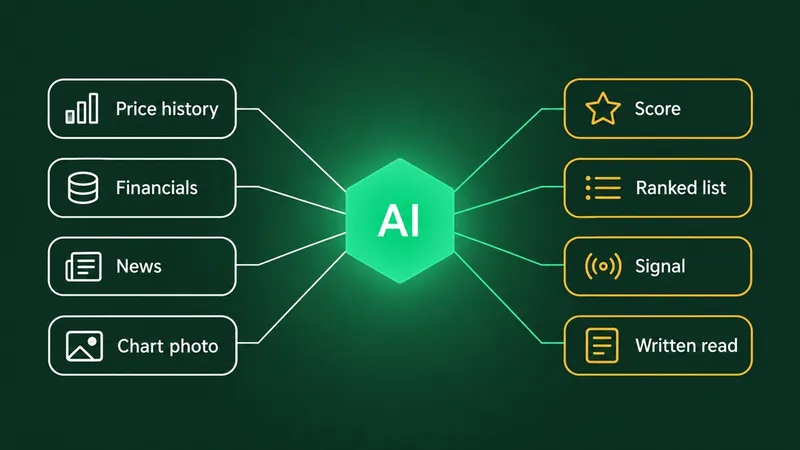
Primo Trade sits fully on the explaining side. You type a US-listed ticker, or take a photo or screenshot of a chart, and the AI reads it. A ticker analysis covers prices, recent news and financial metrics; a chart photo gets a read of the trend, volatility, volume and the chart pattern the AI sees. Either way you get a signal as the AI's read, from Strong Buy to Strong Sell, a Primo Score across Risk, Sentiment, Technical, Fundamental and Growth, a Trading Strategy idea with a risk level, and Key Insights.
Primo Trade gives AI-generated analysis for information and education. It is not financial advice. Markets carry risk; do your own research before you trade.
What it does not do matters just as much here: it places no trades, connects to no brokerage account and runs no bots. It is a second opinion on one stock or one chart, for the moment before you decide.
Where an explanation app falls short
An app that explains has honest limits too. It reads what it was given at that moment, so it cannot watch a position for you. A chart photo with no ticker and no dates leaves the AI guessing at the timeframe, which we covered in how AI reads a chart. And a well-written paragraph can still be wrong, which brings us to the regulators.
Red Flags Regulators Name in AI Trading Apps
In January 2024 the SEC's investor education office, NASAA and FINRA issued a joint investor alert about fraud built on AI hype. It describes unregistered platforms promoting AI systems with lines like "Our proprietary AI trading system can't lose!"
The red flags and warnings it lists are worth memorising:
- High-pressure sales tactics from people who are not registered.
- Claims of "guaranteed returns with little or no risk", in the alert's own words.
- A platform you cannot find among registered firms or exchanges.
- Videos, voices or messages that may be AI fakes of someone you trust, used to move money out of your account.
The same alert carries a warning that applies even to honest tools. AI output "might rely on data that is inaccurate, incomplete, or misleading," it says, and can be faulty or "even completely made up." It also cautions that conversations with chatbots can push people toward emotional or impulsive decisions.
Some names come up again and again. "Quantum AI" is one: Australia's securities regulator, ASIC, lists it on its investor alert list as unlicensed in Australia. Searches for it show up in the same keyword data as every legitimate app, which is exactly why a beginner needs a checklist rather than a gut feeling.
How to Pick the Best AI Trading App for Beginners
There is no single best AI trading app for beginners, because the three kinds answer different needs. These five questions narrow it down fast:
- Who places the order? If the answer is the software, you are choosing a bot, with everything above attached.
- Who holds the money? Look for a named broker-dealer and check it on BrokerCheck before you deposit anything.
- What horizon is the AI talking about? A signal for the next hour and a read for the next year can both be honest and still disagree.
- What does it say about its own limits? A disclaimer you can find in under a minute is a good sign; a track record with no sample, dates or losing trades is not.
- What does it cost to use often? Fees, spreads and subscriptions add up, as the CFTC points out.
For most people starting out, an app that explains is the gentlest first step, because nothing happens unless you act. A signal app fits once you know what horizon you trade. A bot belongs last, after you understand the strategy well enough to explain it without the app.
A free AI trading app is not free of risk
Plenty of these apps are free to download. That says nothing about the risk of what you do next. The market charges the same whether the analysis cost nothing or a monthly fee.
The Short Version
An AI trading app does one of three jobs: it trades for you, it signals, or it explains. The bot kind moves the most work to software and none of the responsibility, and its strategy will meet markets its backtest never saw.
Signal apps keep you in the loop, but only the ones that state their horizon and their history are worth reading. Explanation apps place nothing, which makes them a calm place to learn what a chart or a ticker is telling you.
Whatever you pick, check the broker behind it, distrust any promise of a result, and remember that every regulator quoted here says the same thing in different words: the AI cannot see the future, so the decision stays with you.